

Manage enquiries, staff schedules and client appointments in one place. WelaOS helps hair salons, nail salons and lash studios respond to clients, organise bookings and keep service information easy to find.
Keep salon enquiries and appointments organised
Clients often message to ask about services, prices, appointment times or which team member to book with. WelaOS helps your team manage those conversations alongside staff availability and bookings, so fewer details get lost between inboxes and calendars.
A booking request has two parts: what the client wants done and who they hope will do it. A cut or colour, a nail service, and a lash new set or infill each need clear service information; the requested stylist, technician, or artist must also be assigned to the service and available at the chosen time.
1. Start with the service the client has in mind
Hair clients may ask about a cut, colour, or styling appointment and the stylist they prefer. Nail clients may be comparing configured services and asking which technician is available. Lash clients may need to choose between a new set and an infill. Clear service names and details help the client and team confirm the request before checking the calendar.
- Hair salons: Keep stylist schedules, service information, and client appointments together.
- Nail salons: Organise nail services, technician availability, and appointment details.
- Lash studios: Give new sets and infills distinct configured service details so clients can select the service they mean and the team can confirm it.
2. Check which team member is actually available
For a salon booking, a free-looking time is not enough if the requested service takes longer than the remaining shift or the preferred team member is already booked. WelaOS uses configured service duration, provider assignments, working hours, breaks, time off, existing bookings, and required resources when checking availability.
Depending on the booking setup, clients can choose from eligible team members, or the business can assign randomly from available providers or use Round Robin. The business defines which team members are assigned to each service and which assignment options clients can use.
3. Keep the appointment connected to the enquiry and checkout
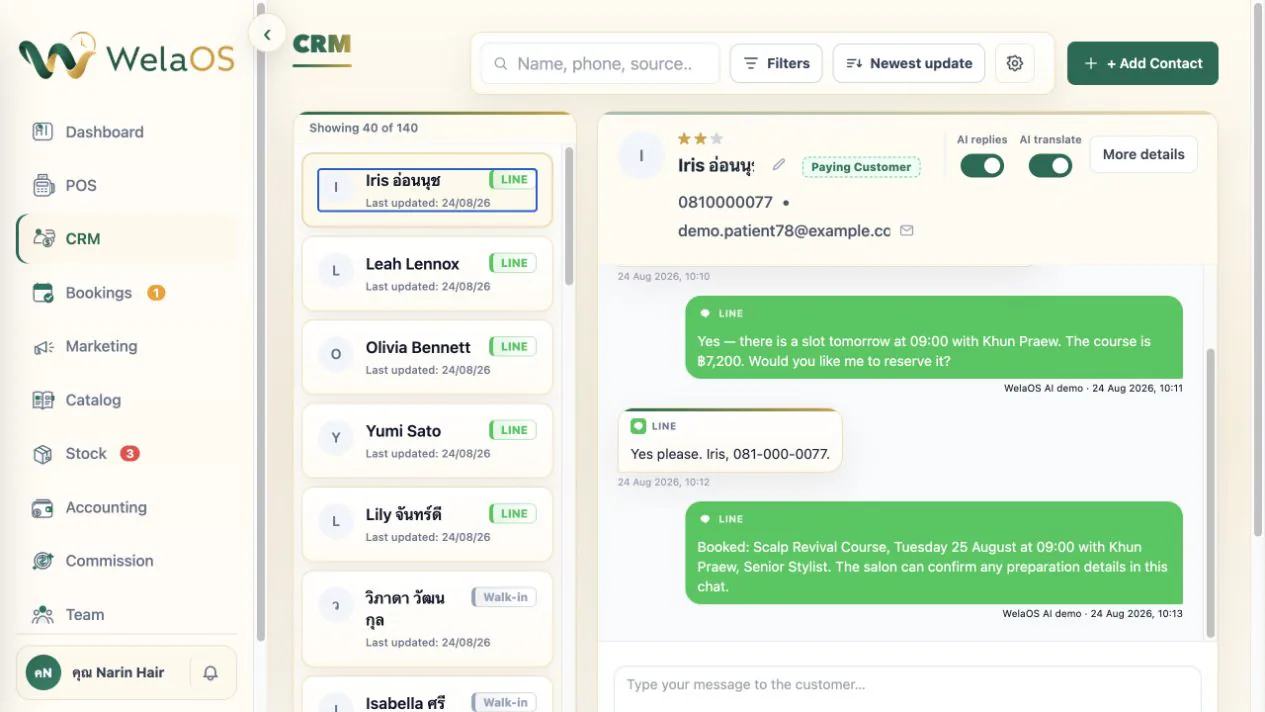
Clients can use a branch's public booking page or an enabled messaging route. Staff can also enter appointments, phone requests, and walk-ins. AI answers or booking are available only when the business's package, settings, and connected channel support them; the assistant uses configured business information and staff can review a request or take over when needed.
When a conversation is linked with a CRM contact, the team can keep the client's questions and appointment details together. That gives staff the context to confirm the service and team member without treating a chat message as a saved booking.
When a booked service is successfully checked out in POS, WelaOS completes the booking and creates commission records from the configured rules. A rule can use a percentage or fixed amount and be narrowed by service, product, team member, or branch. The record follows the business's approval and payout workflow.
A completed booking without POS checkout does not create the automatic commission record. Keeping the checkout tied to the service and team member gives the manager a reviewable record based on the rule that was configured.
4. Keep service details current across branches
Each branch can offer its configured services, prices, durations, team members, schedules, and booking page. Shared service definitions can stay consistent while local offerings and provider availability reflect the branch. Owners can work across branches, while branch managers use the information and modules assigned to them.
From the first enquiry to the next appointment
Keep the service request, the requested team member, current availability, customer conversation, and appointment details in one workflow. Your team defines service names, durations, provider assignments, and schedule rules; WelaOS uses that setup to present booking choices and keep the resulting record available to staff.
Explore the WelaOS growth loop or browse the use-case directory for other service-business workflows.
Frequently asked questions
Can clients choose the service they want?
Yes. Clients can choose from services the business has made available through its booking route. Clear names and details help them distinguish services such as a lash new set and an infill.
How does WelaOS check stylist or technician availability?
Availability uses the configured service duration, provider assignments, working hours, breaks, time off, existing bookings, and any required resources.
Can a client request a particular team member?
The business can allow clients to choose an eligible team member or use another configured assignment rule. A requested provider must be assigned to that service and available for the selected time.
How should a lash studio handle new sets and infills?
Set up distinct service names and details, including the duration the studio uses for each. Clients and staff can then select or confirm the intended service before saving the appointment.
Can staff add appointments for clients?
Yes. Staff can enter appointments, including phone requests and walk-ins, using the business's configured services, team, and availability.
Can clients book without using AI?
Yes. Clients can use an enabled public booking page, and staff can enter bookings. AI answers and booking are optional and depend on package, settings, and connected channels.
Can the team keep a client's questions with the booking?
When the conversation is linked to the CRM contact, the team can view the customer context alongside appointment details.
When are commission records created?
A successful POS checkout of a booked service creates commission records according to the configured rules. Approval and payout follow the business's commission workflow.