

A medical clinic does not lose control of patient flow only when the waiting room becomes busy. It loses control at the handoffs: reception has accepted the patient, nursing has saved the intake, the doctor has requested a Blood Test, the result is still pending, and nobody should have to ask three people where the patient belongs next. WelaOS keeps that work on one Medical Clinic Visit from acceptance to a signed OPD record and the exact POS checkout.
1. Accept the patient into the clinic without inventing an appointment
Emma arrives without a booking. Reception searches the existing CRM record, confirms the patient, records persistent fatigue and intermittent dizziness as the visit reason, and accepts the patient into Clinic Visit. If this were a new patient, reception could instead open the full patient form or use the supported Thai ID or passport intake path. The walk-in visit remains attached to the real customer identity, but it does not create a fake calendar event.
The first live position is Reception. That distinction matters because WelaOS supports both walk-in and appointment-led medical clinics. A busy outpatient clinic can accept a walk-in directly into Clinic Visit. A private clinic can use Bookings to reserve an exact time with an eligible doctor and the required room or resource. Confirmation stores those assignments and protects their capacity from an overlapping booking. When the booked patient arrives, Clinic Visit takes over the physical journey inside the clinic. A hybrid clinic can use both paths on the same day.
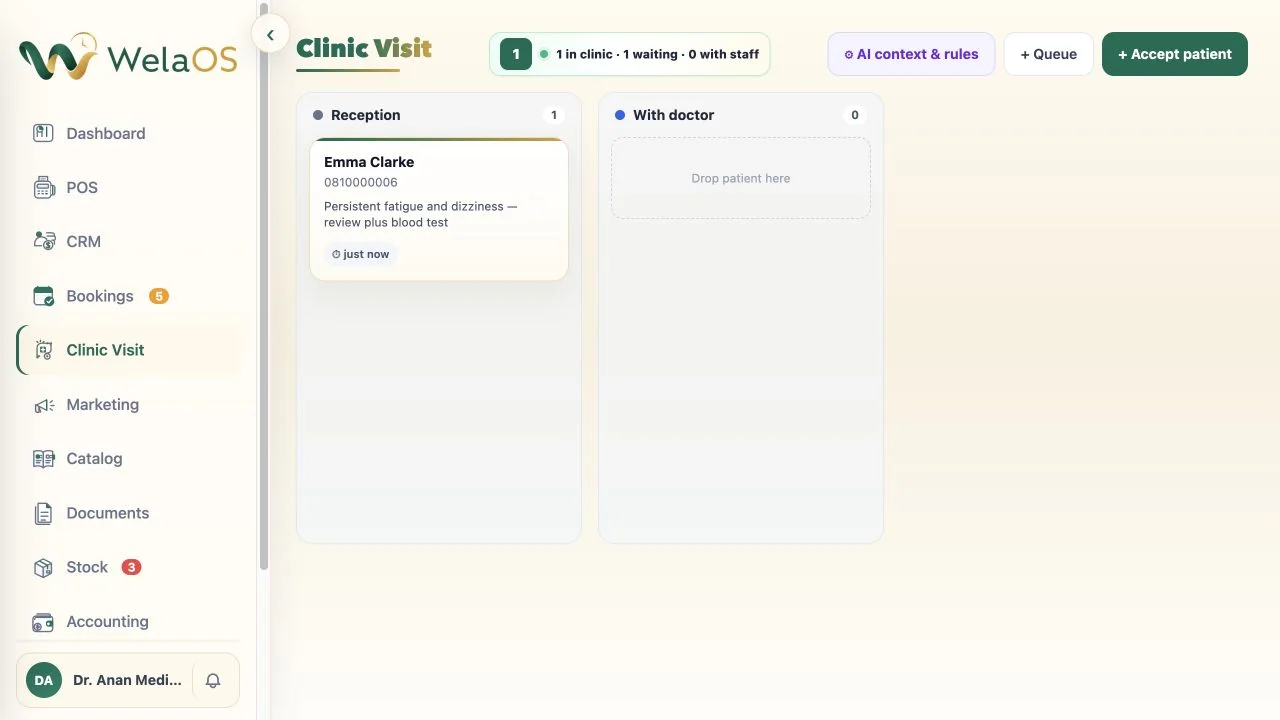
The live board is intentionally operational. It shows the queue and elapsed wait, not the amount the patient might eventually pay. Clinical movement and billing are separate decisions, and merging them too early makes both harder to trust.
2. Save nursing intake once, then move the same case to the doctor
A nurse opens Emma’s visit and records the chief complaint, symptom duration, nursing notes, relevant patient medical notes, and vital signs. Narrative fields can use the shared dictation control; prescription rows remain structured. Each save keeps the staff member and time, so the next clinician is not reading an anonymous summary pasted out of a chat.
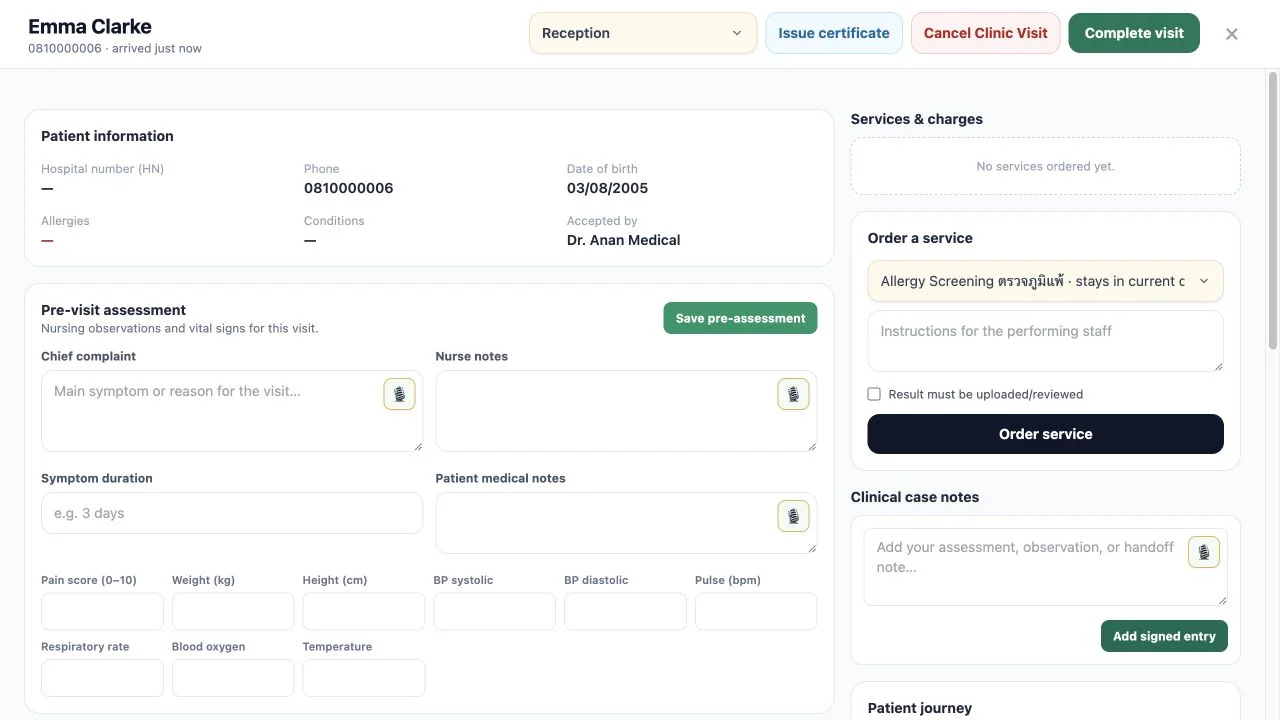
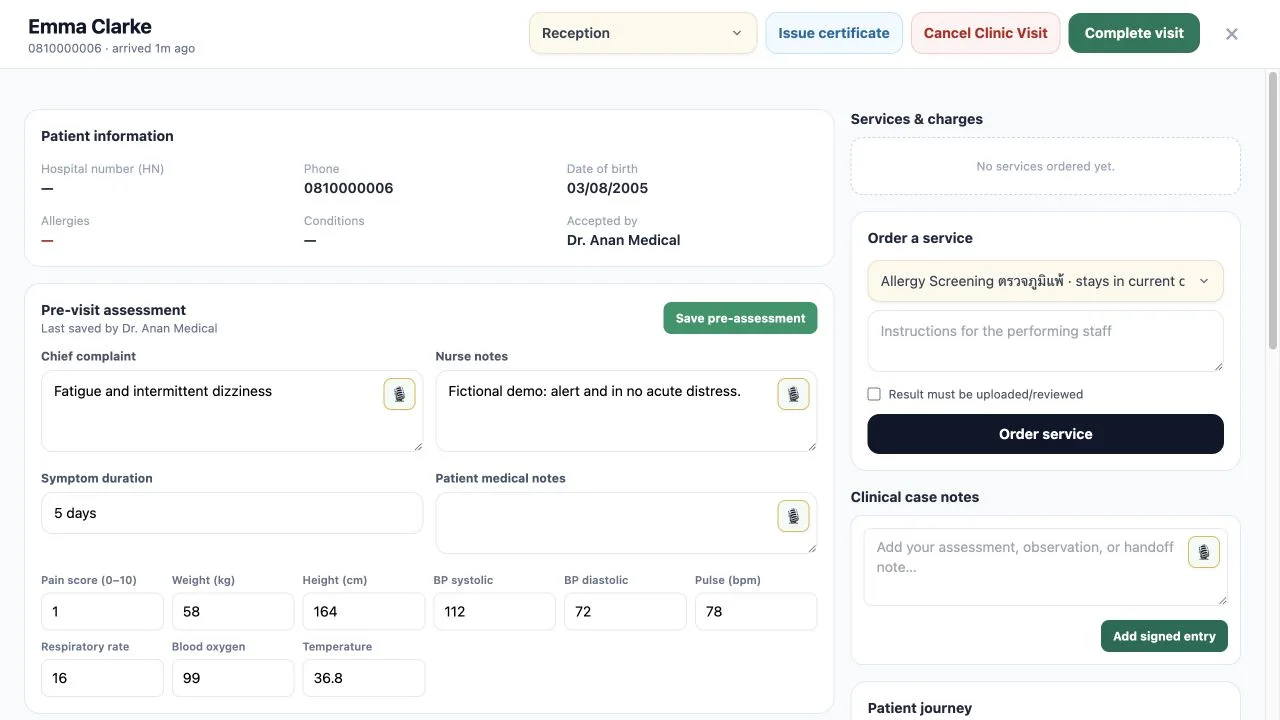
When the pre-assessment is ready, the patient moves to With doctor. The journey now shows the acceptance and the queue movement, while the same visit contains the intake. Nothing needs to be recreated as a second record.
For the clinic owner, this is the first useful design question: which information must be ready before a patient moves, and which role is responsible for recording it? Software cannot make that decision for the clinic, but it can make the decision visible and repeatable.
Queue ownership is a handoff contract, not merely a location label. Reception owns the arrival and patient-identity check. Nursing owns the saved pre-assessment. The doctor owns the decision to order another service, while the linked service queue makes that outstanding work visible to the team expected to perform it. When the service is completed and the patient is routed back, the next owner can see both the return and the evidence that came with it. WelaOS preserves the explicit, timestamped and attributed movement; the clinic still defines the roles and its escalation procedure.
Saving information and moving the patient should therefore be treated as two related staff checks. A nurse can save vital signs before deciding the intake is ready for the doctor. Service staff can attach a report before completing the performed service. The queue answers “who should act next?”, while the visit answers “what has actually been recorded?” Keeping those questions separate gives medical clinic queue management an operational meaning without pretending that a board replaces clinical communication.
3. Treat a Blood Test or X-ray as a real service handoff
After reviewing the intake, the doctor orders the internal Blood Test Panel service. The clinic has linked that Catalog service to its laboratory queue, so the order routes Emma there automatically. An X-ray service can follow the same pattern when it is linked to an imaging queue.
The order records who requested the service. The result later records who actually performed it. While the Blood Test Panel remains pending, Emma stays visible in its service queue instead of disappearing into a note that says “waiting for result.”
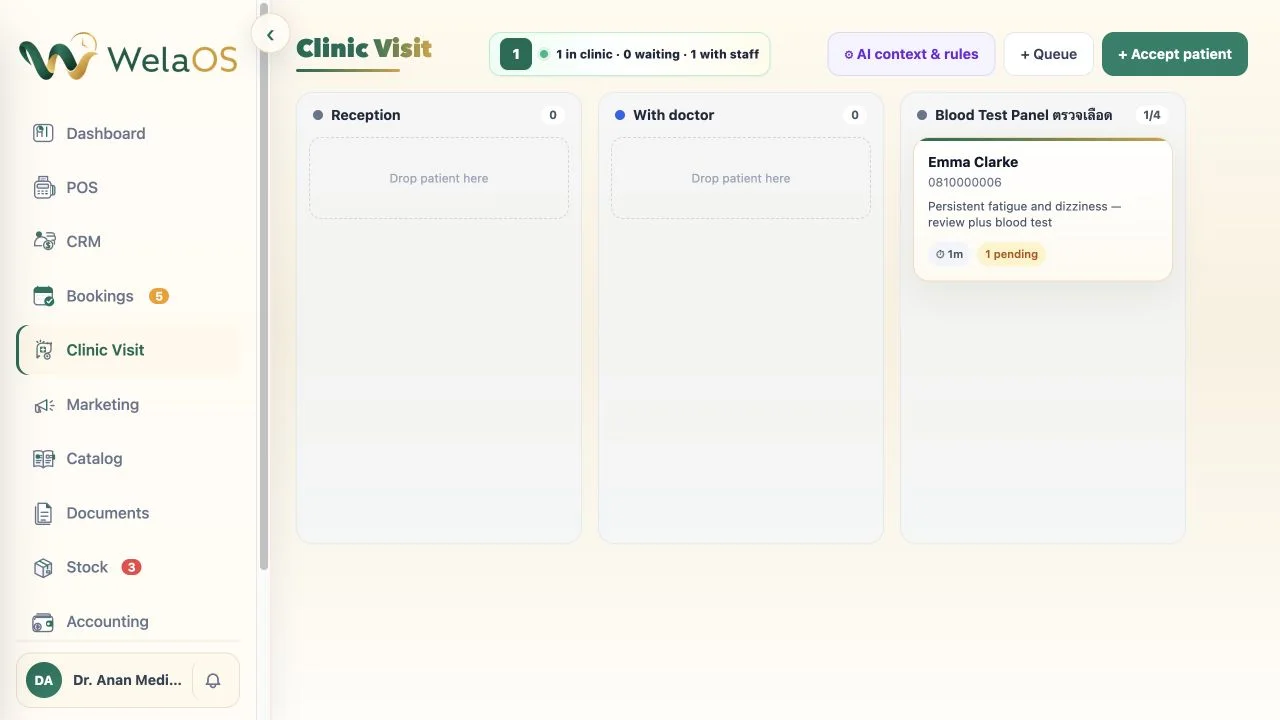
A completed result can carry a note and a protected PDF, image, or report attachment. Finishing it returns the patient to Reception unless the team selects another queue. The provider can then continue the same visit with the result beside the intake and doctor evidence.
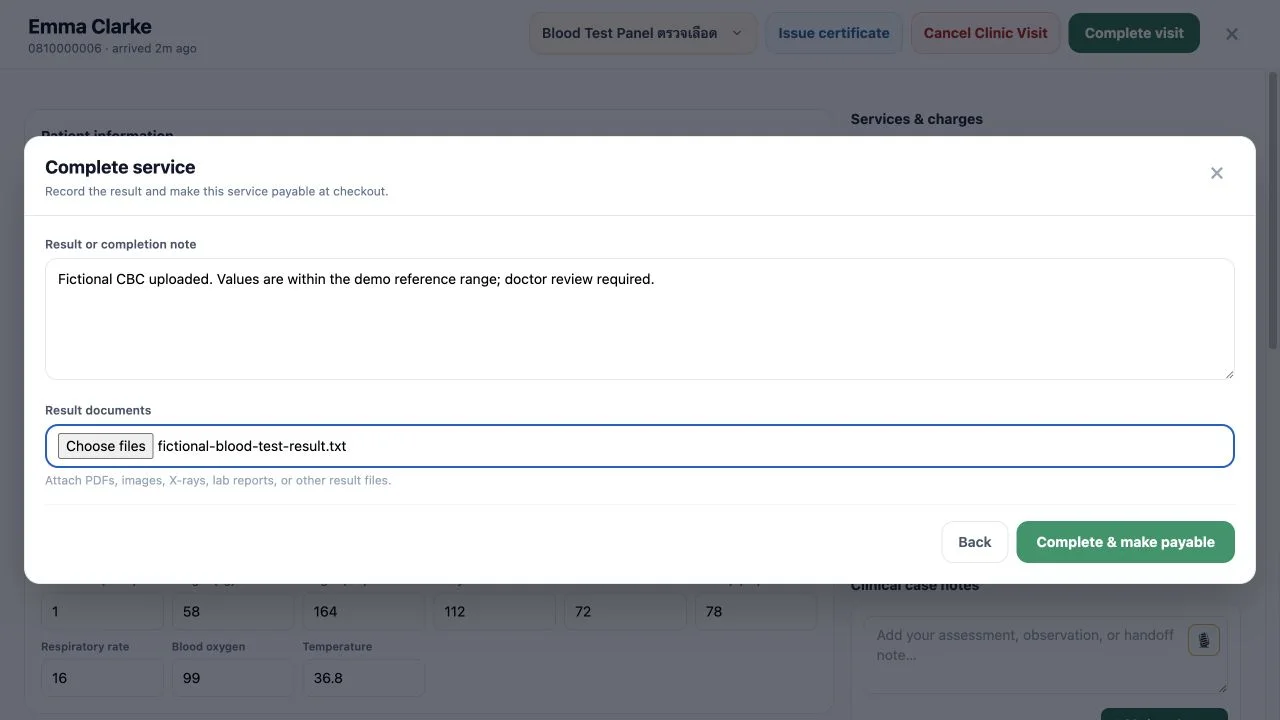
For clinic operations, the order and result should be read as a chain of evidence. Ordered records that the clinician requested the service. Pending keeps the unfinished task visible in the linked queue. Performed identifies that the work was completed and allows the result note or attachment to return with it. Provider review then determines what that evidence means for the encounter. Uploading a report does not interpret it, and requesting a service does not prove it happened.
The same distinction applies to every linked laboratory or imaging service added to a visit. It lets reception distinguish a patient waiting for work from one whose work has returned, lets the service team distinguish its open tasks from completed ones, and lets the doctor review the result without confusing the order time with the performance time. It also protects checkout from treating an intention as a delivered service.
4. Let AI draft only after the encounter evidence is ready
Back with the doctor, the visit now contains the pre-assessment, vital signs, doctor notes, examination, clinical case notes, and the fictional Blood Test Panel result. This is the point at which an eligible clinic can use AI suggest all.
The action prepares editable drafts for Assessment & Recommendations, the treatment and procedure fields, Care & Follow-up, and, only for a medical clinic, a prescription suggestion constrained by the clinic's active rules. The clinic defines condition-specific or medicine-specific prescription rules and links them to approved medicines in the shared Stock catalog. Only the small set of active rules that matches the current encounter is provided to AI. It can consider supported result attachments, but it must treat missing or unreadable evidence as missing. It cannot invent a medicine or dose.
The stock connection continues after clinician review. Saving a prescription does not deduct inventory. When reception records the medicine as dispensed, WelaOS deducts the exact quantity from that branch's linked stock provider and keeps an audit record. If the remaining quantity falls below the clinic's threshold, staff receive a low-stock notification. A stock purchase recorded in Accounting can top up the same branch stock record, keeping the shared medicine catalog, branch quantities and purchasing record connected. WelaOS does not place an automatic order with a supplier or central store.
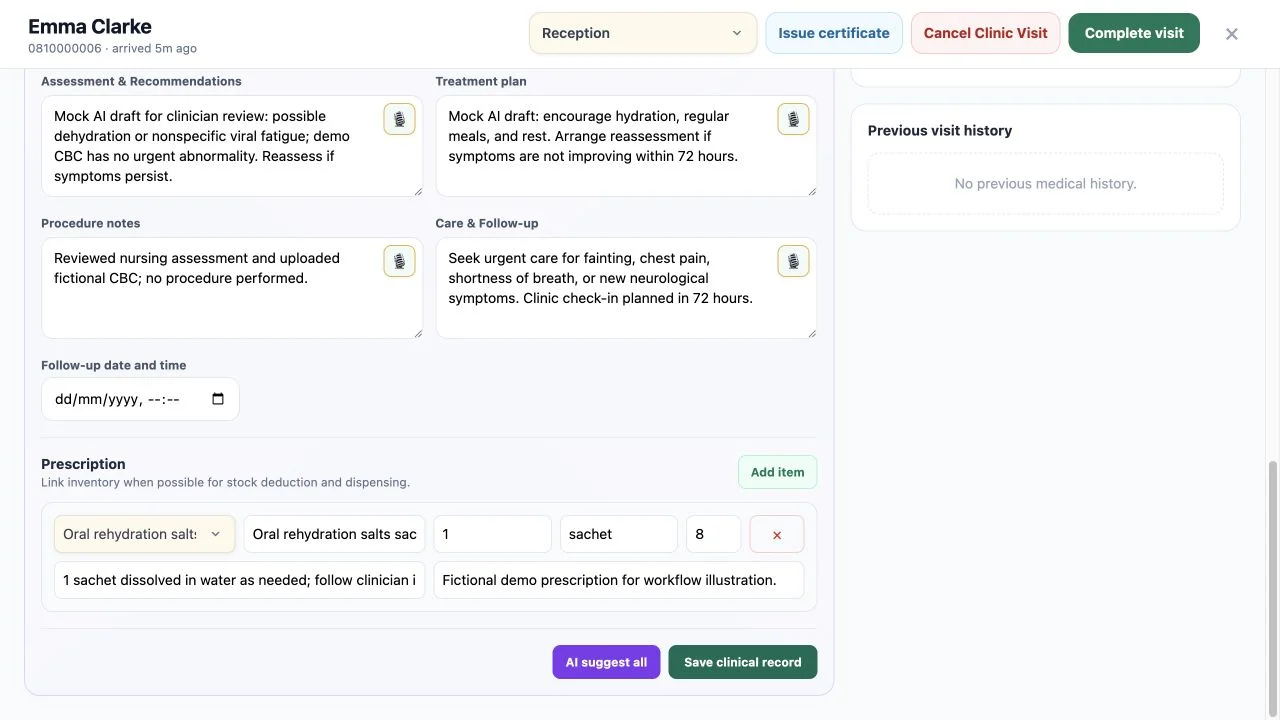
The clinician reviews the assessment, medicine selection, dose, contraindications, consent, follow-up timing, and escalation before saving the clinical record.
Saved is not the same as signed. While the visit remains open, the clinician can review the encounter evidence, edit the draft fields, correct or remove prescription rows, and save the clinical record. Complete visit is the later accountability point: the provider sees the assembled clinical sections, completed services, result evidence, prescription and follow-up plan together before explicit approval. AI cannot move the record across that boundary, and an editable draft does not become an OPD document simply because it has been saved.
That separation matters when information arrives in stages. The provider can reconcile the nursing intake with the performed-service result before finalization, rather than signing a partial snapshot and relying on a later note to explain it. The provider licence and stored signature belong to the sign-off, while the approved wording belongs to the frozen treatment history. The resulting OPD Card and optional prescription PDF are outputs of that reviewed record; they are not independent AI summaries.
5. Complete the visit before asking POS to collect money
Complete visit opens the provider review. Finalization requires the clinical record, completed services and results, the provider’s licence and stored signature, and explicit approval. Only then does WelaOS freeze the encounter into its immutable treatment history and create the bilingual OPD Card plus an optional prescription PDF.
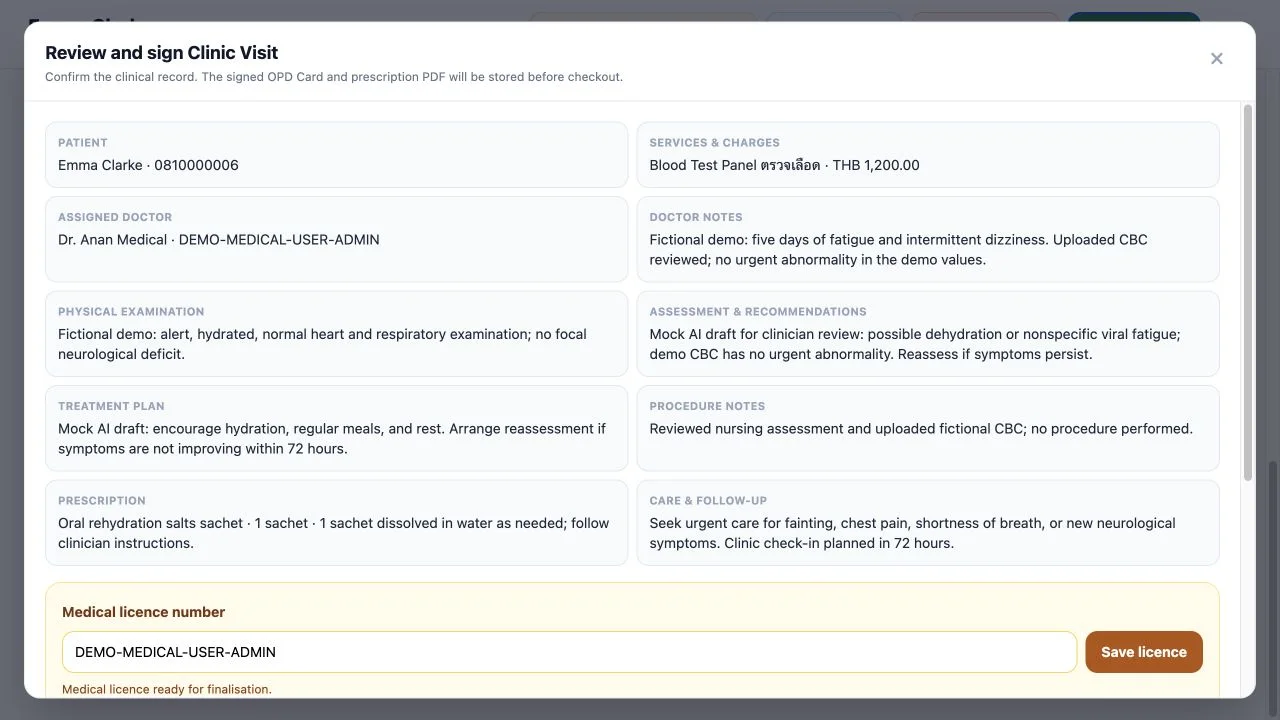
The frozen history retains more than a summary paragraph: it preserves the visit reason and priority, pre-assessment, provider fields, authored entries, queue movements, ordered and performed services, result attachments, certificates, prescription, and the provider-approved care instructions. Those approved recommendations appear in the OPD record rather than being sent as an unreviewed AI message. A later visit can open the completed snapshot as previous history without rewriting it.
Staff can view, download, and print the signed OPD Card and the final prescription document. In this walk-in flow, reception can hand those provider-approved documents to Emma before payment or at the desk. A patient whose connected messaging identity matches the CRM record can also ask WelaOS to send a secure, short-lived link to a final OPD Card.
- Patient
Send my OPD Card. - WelaOS record workflow
Here is your available final OPD record.📄 OPD Card Blood Test Panel
24 Aug 2026
FINAL Open record - Patient
Open OPD Card. - WelaOS secure document
Your short-lived secure PDF is ready.🔒 OPD Card - Blood Test Panel Secure link expires soon Download PDF
This document retrieval is a deterministic identity-checked workflow, not the AI guessing which record belongs to the person in chat. For this standalone walk-in flow, the verified connected-channel handoff covers the final OPD Card; automatic LINE delivery of its standalone prescription is not part of the workflow described here.
6. Carry the exact performed visit into POS
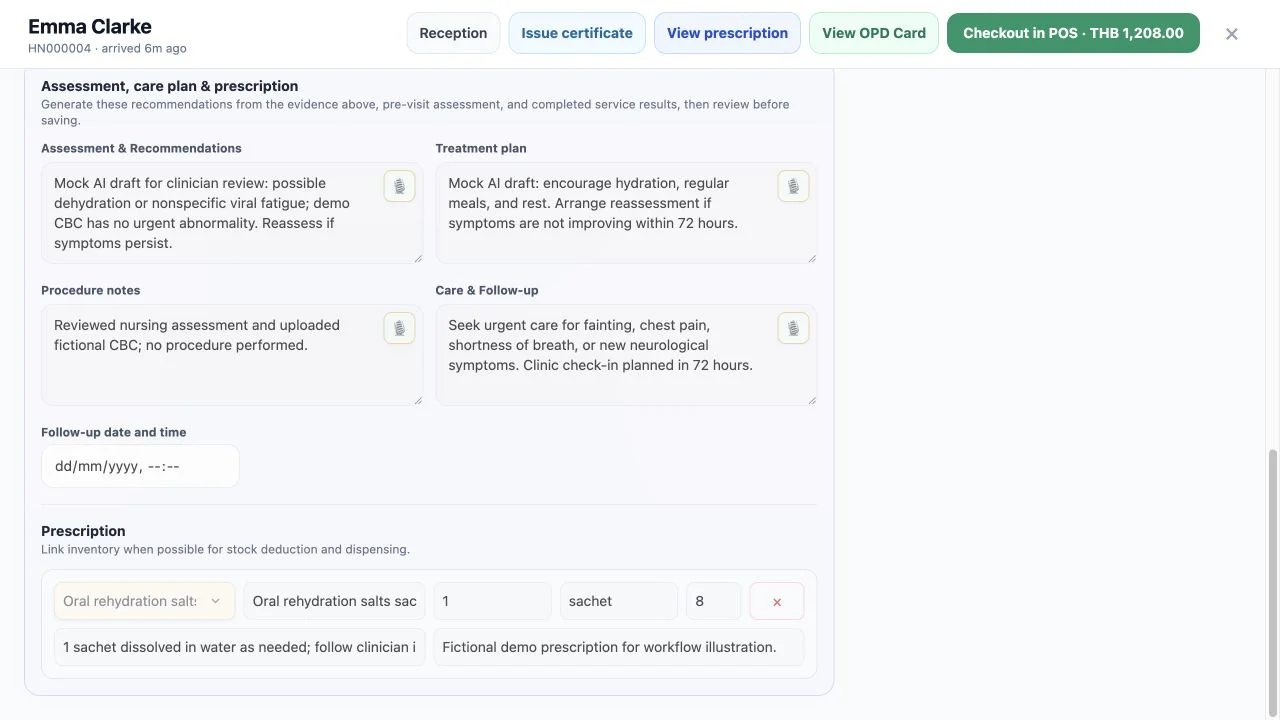
After finalization, the visit header changes to Checkout in POS. The action opens POS with Emma’s approved Clinic Visit already selected. Performed services and chargeable prescription items are preloaded. Ordered but unperformed work does not quietly become revenue.
POS eligibility is therefore exact rather than approximate. A service must be performed, not merely ordered or left pending. A cancelled service remains void. The Clinic Visit itself must pass provider review and finalization before its checkout handoff appears. Chargeable prescription items can then travel with the finalized visit, but POS does not add every Catalog item associated with the patient or infer what the clinician intended. It receives the eligible items from this approved encounter.
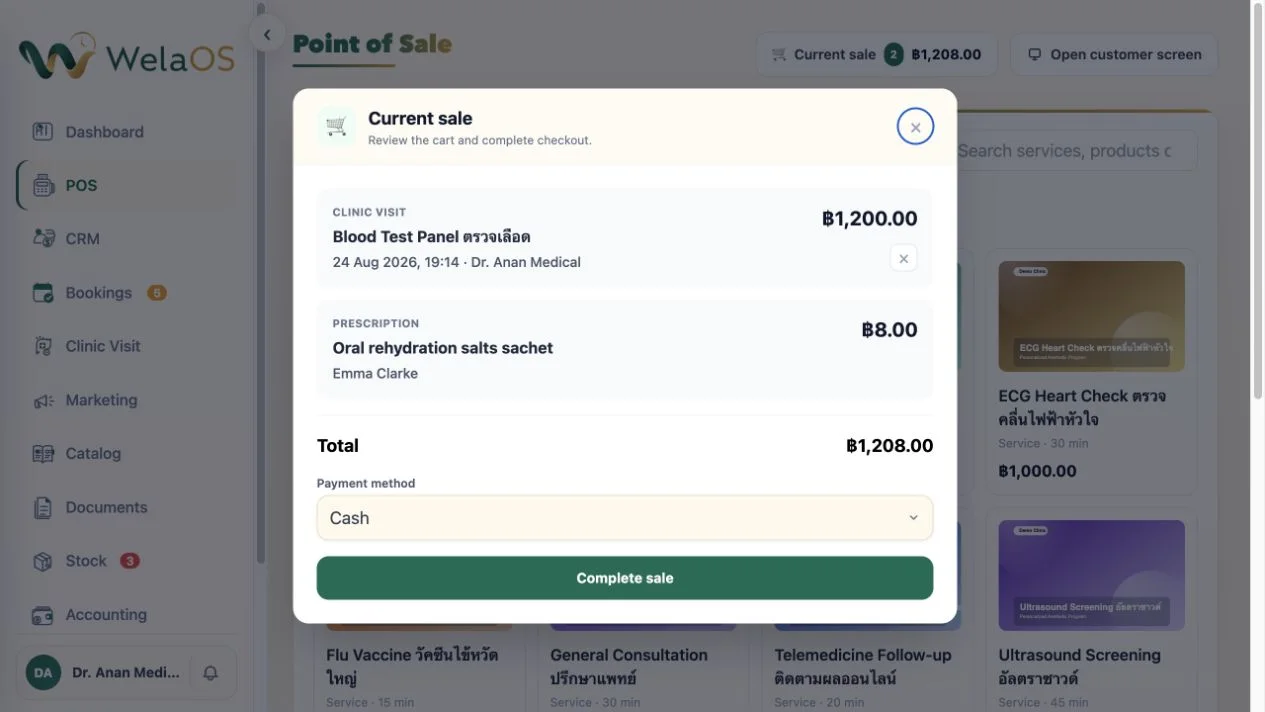
Reception reviews the current sale, takes the configured payment method, and completes checkout. Successful payment marks the charges paid, removes Emma from every live queue, adds the completed receipt to the same CRM patient history, and keeps the provider-approved treatment snapshot intact.
The order of operations is deliberate:
- the team proves what was performed;
- the provider approves and signs the clinical record;
- POS charges the approved performed work;
- the receipt joins the patient’s visit documents.
POS is therefore the financial end of the visit, not the system that decides whether a Blood Test was clinically complete.
7. What a safety-bounded 72-hour AI follow-up can and cannot do
On an eligible package, the clinic can enable AI Follow-up, choose review-first or automatic delivery, and set the connected conversation’s inactivity timer to 72 hours. This is an inactivity follow-up, not a clinical monitoring protocol tied automatically to checkout.
The clock belongs to the connected conversation, not to the Blood Test completion, OPD signature, prescription issue, or POS receipt. In review-first mode, staff can inspect prepared wording before delivery; automatic delivery requires the clinic to enable it explicitly. Either way, the safe opening remains a general invitation to reconnect. It should not expose encounter details or turn the configured delay into a promise that someone has clinically monitored the patient for 72 hours.
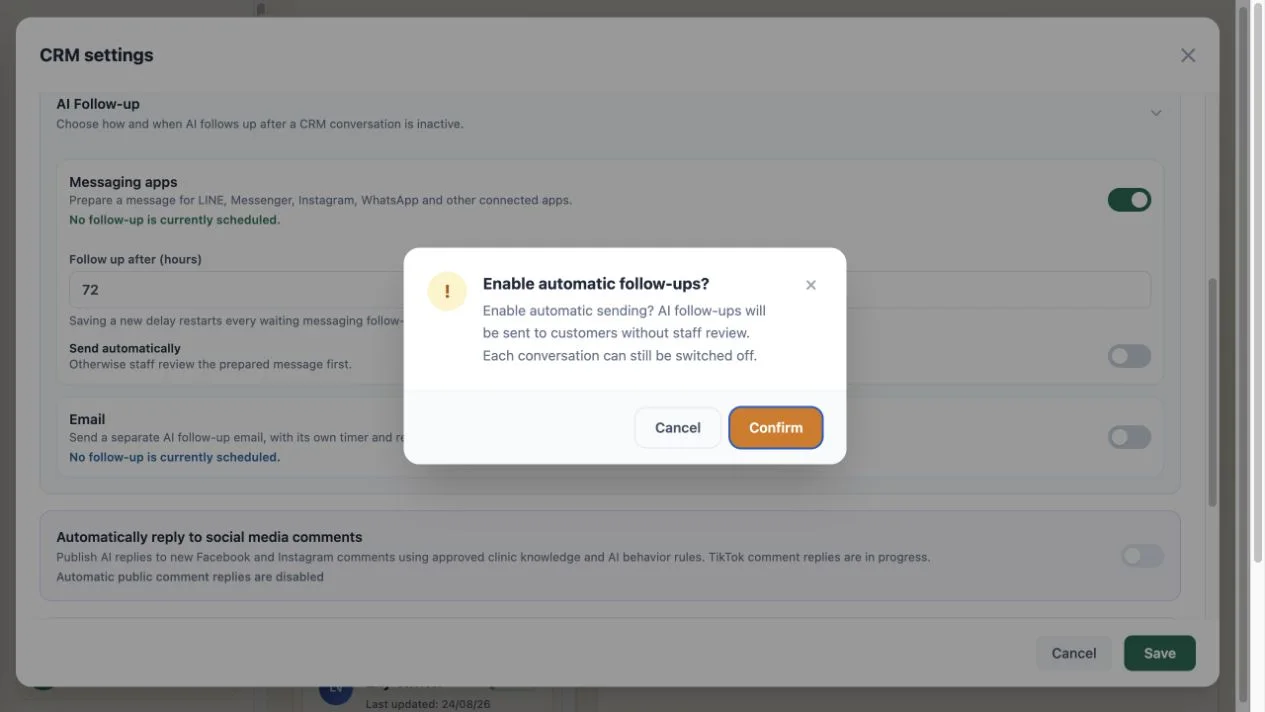
In this fictional scenario, once the connected conversation has been inactive for the configured delay, the prepared wording is intentionally general. It can check in and invite the patient to contact the team. It cannot ask whether medicine was taken, interpret pain or swelling, reuse the diagnosis, or give aftercare from the private medical record.
- WelaOS follow-up, 72-hour timer
Hello, just checking in after your recent visit. We hope you are doing well. Reply here if you would like help from the clinic team. - Patient
I still feel a little dizzy and I missed one of the sachets. What should I do? - WelaOS safety handoff
Thank you for telling us. I’m handing this conversation to the clinic team so they can respond safely. - Patient
Thank you. I can continue here.
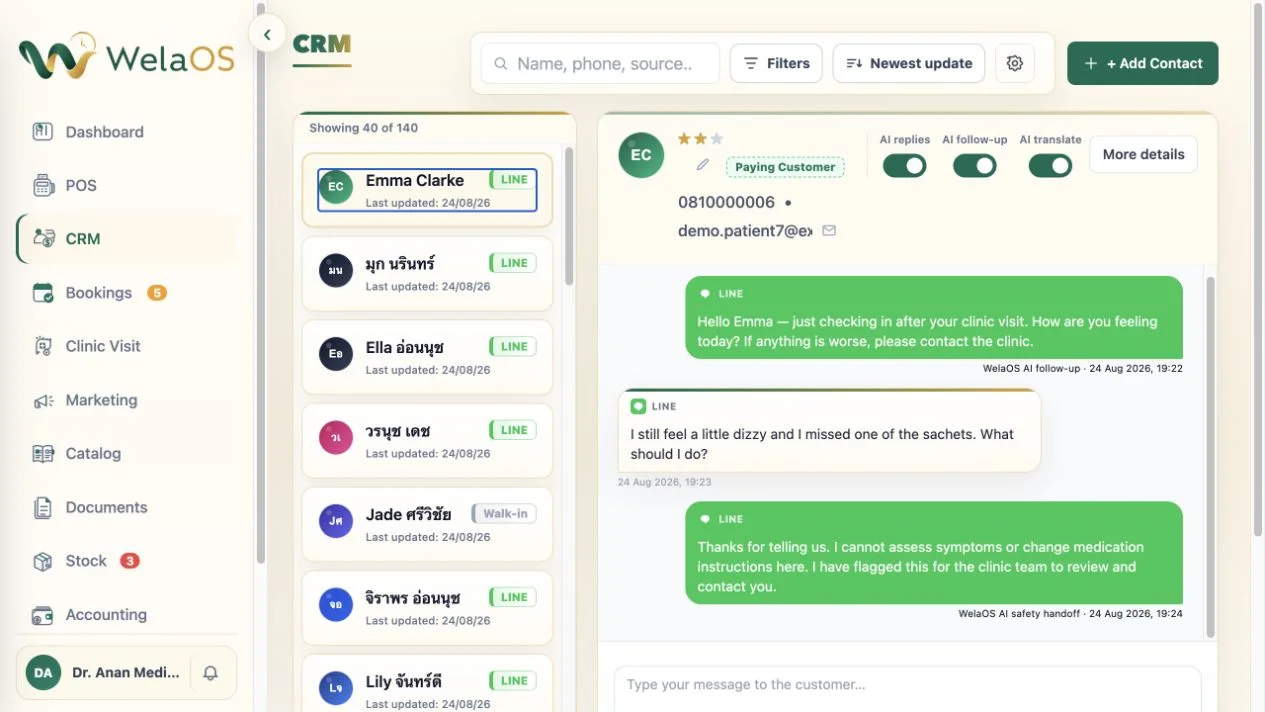
That handover is not a weaker version of the feature. It is the necessary boundary between customer-engagement automation and clinical responsibility. The AI can reopen the channel; qualified staff carry on when the answer depends on symptoms, medicine, or a private record.
The clinic still needs to decide who owns that handover and how it fits its clinical-response process. When Emma mentions continuing dizziness and a missed sachet, the safe automated action is acknowledgement and transfer, not a missed-dose instruction, a severity judgement, or a rewritten care plan. The assigned staff member can then review the provider-approved record and respond under the clinic’s process. WelaOS makes the conversation visible for human continuation; it does not turn a marketing follow-up timer into remote medical supervision.
One patient journey, without one overloaded status
For a medical clinic, “in progress” is not precise enough. Emma can be waiting in the Blood Test Panel queue, have a pending result, remain clinically unfinished, and have nothing payable yet, all at the same time. WelaOS keeps those states connected without collapsing them.
Reception sees where the patient is. Nursing and service staff contribute to the same attributed visit. The doctor reviews the complete evidence and any AI-assisted draft. Provider approval creates the signed OPD record. POS charges only the performed work. A later generic check-in can reopen contact, while a medical reply moves to the people qualified to answer it.